Here is the metadata: http://i1199.photobucket.com/albums/aa467/Jordan_Sanjaya/s
ID: 3547106 • Letter: H
Question
Here is the metadata: http://i1199.photobucket.com/albums/aa467/Jordan_Sanjaya/sql.png
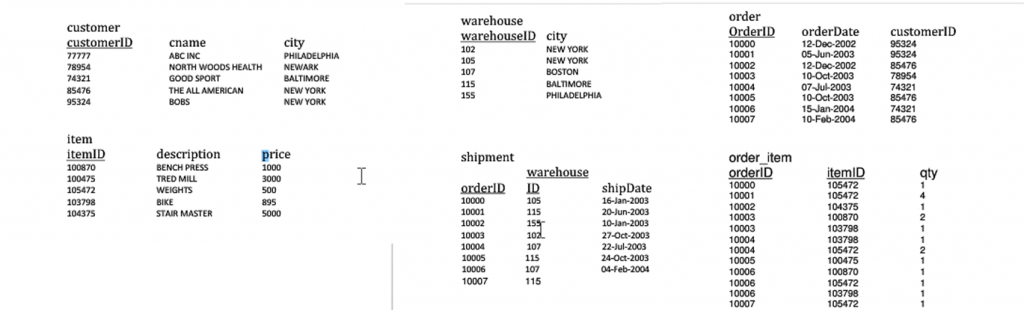
1. Find the orderID and shipDate for all orders shipped from Warehouse number 115.
2. List the orderID for orders that were shipped from all warehouses that the company has in New York.
3. Produce a listing: custName, No_of_orders, avg_order_amt, where the middle column is the total number of orders for the customer and the last column is the average order amount for that customer. HINT: Use column aliases to get the column headings listed above to display for the output. Also, this requires two aggregate functions to be listed in the SELECT clause.
4. List the orders that were shipped between January 2003 and December 2003.
5. Find the customerID, customer name, orderID and total value of the order for those orders that have not been shipped. HINT: Orders that have not been shipped have a NULL value for the shipDate.
6. Update the shipDate for orderID 10007 to today
Find the orderID and shipDate for all orders shipped from Warehouse number 115. List the orderID for orders that were shipped from all warehouses that the company has in New York. Produce a listing: custName, No_of_orders, avg_order_amt, where the middle column is the total number of orders for the customer and the last column is the average order amount for that customer. HINT: Use column aliases to get the column headings listed above to display for the output. Also, this requires two aggregate functions to be listed in the SELECT clause. List the orders that were shipped between January 2003 and December 2003. Find the customerID, customer name, orderID and total value of the order for those orders that have not been shipped. HINT: Orders that have not been shipped have a NULL value for the shipDate. Update the shipDate for orderID 10007 to today's date. List the names of the customers in descending order.Explanation / Answer
1)
select orderID, shipdate from shipment where warehouseid = 115
2)
select shipment.orderid
from shipment,
warehouse
where shipment.warehouseid = warehouse.warehouseid
and warehouse.city = 'NEW YORK'
3)
select customer.cname, no_of_order count(distinct order.id), avg(item.price)
from customer,
order,
order_item,
item
where customer.customerid = order.customerid
and order.orderid = order_item.order_id
and order_item.item_id = item.itemid
group by cname
4)
select order.* from
order,
shipment
where order.orderid = shipment.orderid
and shipment.shipdate >= '01-Jan-2003'
and shipment.shipdate <= '31-Dec-2003'
5)
select customer.customerid, customer.cname, order.orderid, sum(item.price) totalvalue
from customer,
order,
order_item,
shipment,
item
where customer.customerid = order.customerid
and order.orderid = order_item.orderid
and order.orderid = shipment.orderid
and order_item.itemid = item.itemid
and shipment.shipdate IS NULL
group by customer.customerid, customer.cname, order.orderid
6)
update shipment
set shipdate = trunc(sysdate)
where orderid = 10007
7)
select cname
from customer
order by desc